For Watch Trading Toolkit readers · from the team that makes it
Watch Trading Toolkit × WristBook Start free for 14 days
The next step from the Toolkit

You've got your number. Now run the business.

The Toolkit tells you what to pay, what to file and what to keep. WristBook is where you do it, on every watch you buy and sell.

14 days freeThen Essentials, $29/moCancel anytime in Settings
Max buyThe Toolkit
You'll sell it for$8,500.00
Most you should pay
$6,333.20
Card processing (2.9% + $0.30)−$246.80
Shipping, insurance, prep−$220.00
Your margin (20%)−$1,700.00
Work your own number in the Toolkit ↗
Bought it? Log it in WristBook
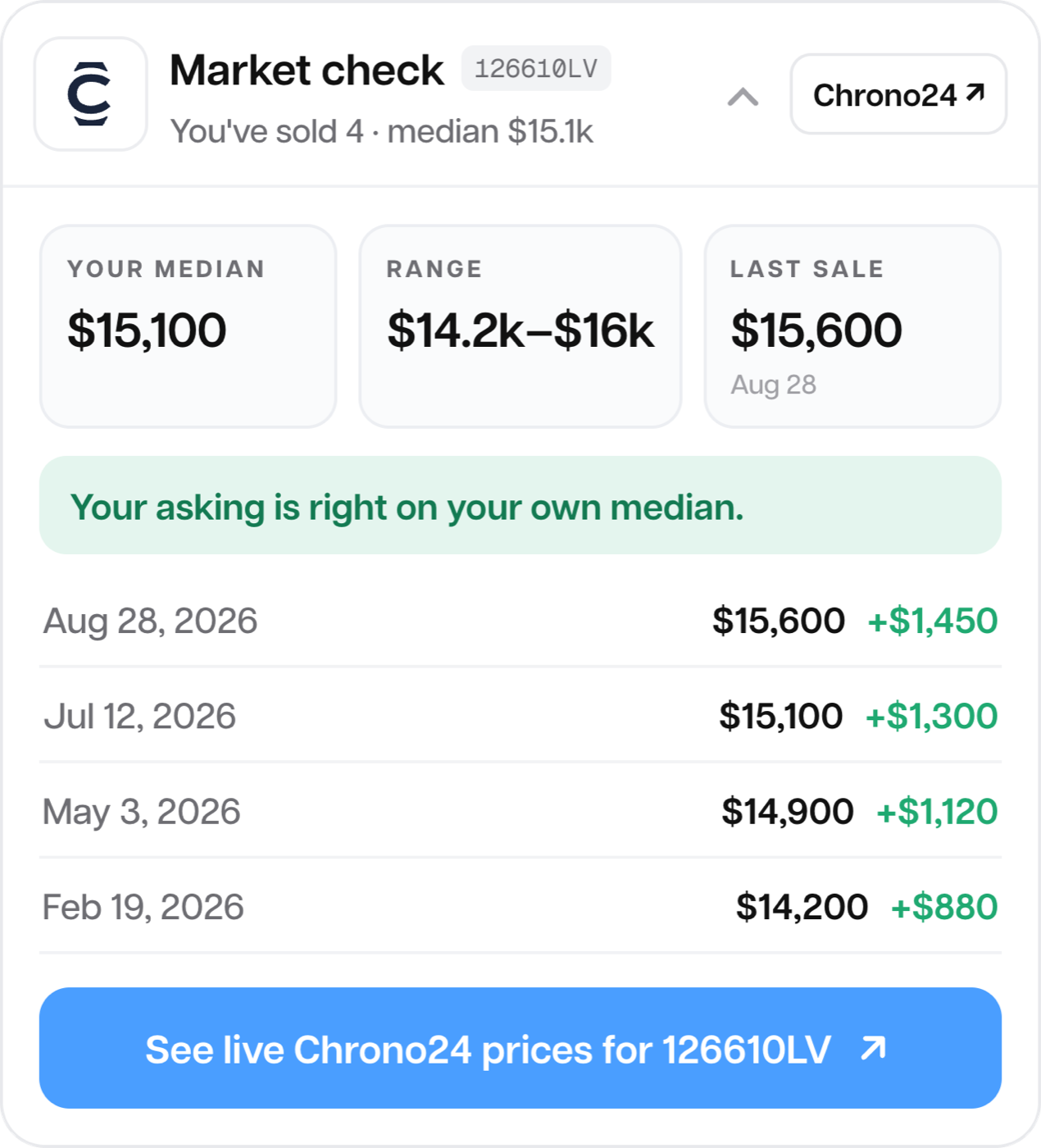
Sample dataWristBook's Market check on a Rolex Submariner: your median sale price, your range, your last sale and your recent sales with profit.
WristBook in your pocket

Your whole case, on your phone.

Log a watch at the table, see your whole case at a glance, and ask Case anything, wherever the deal happens.

1Log it2Track it3Ask about it

Screens show sample data.

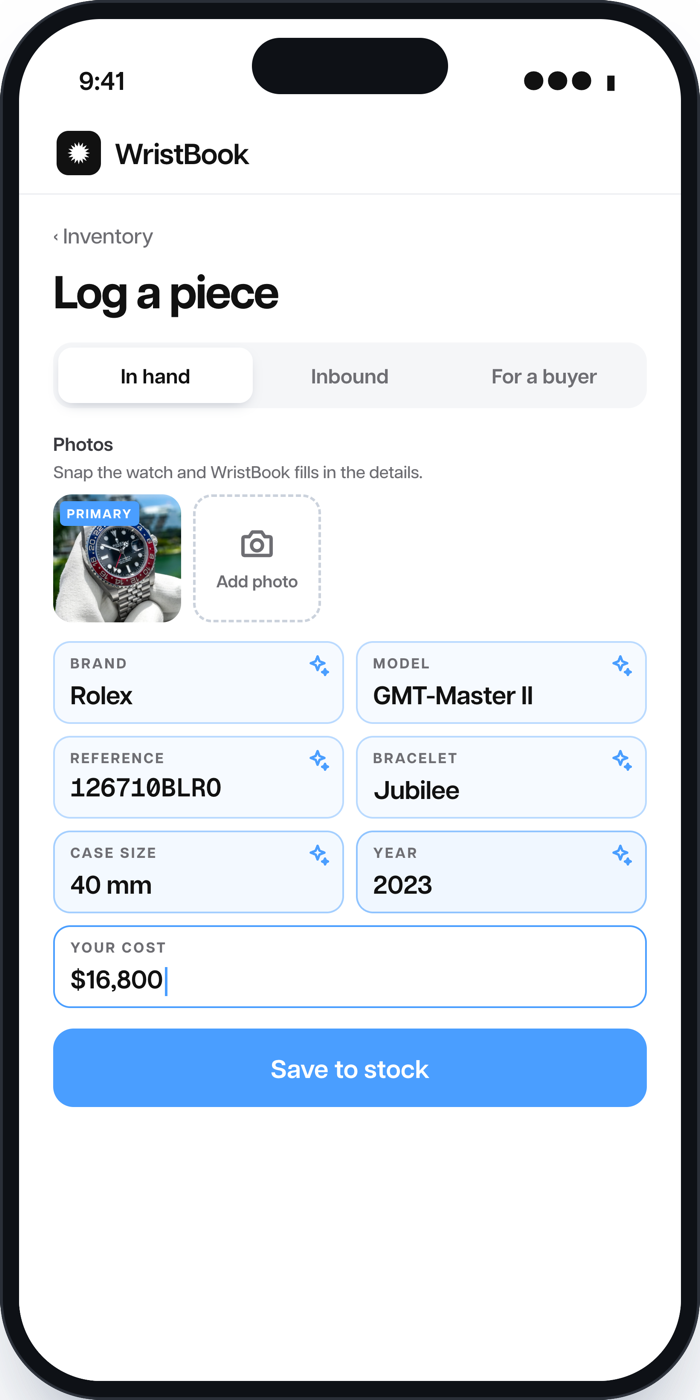
Logging a Rolex GMT-Master II in WristBook: the photo filled in the brand, model, reference, bracelet, size and year.
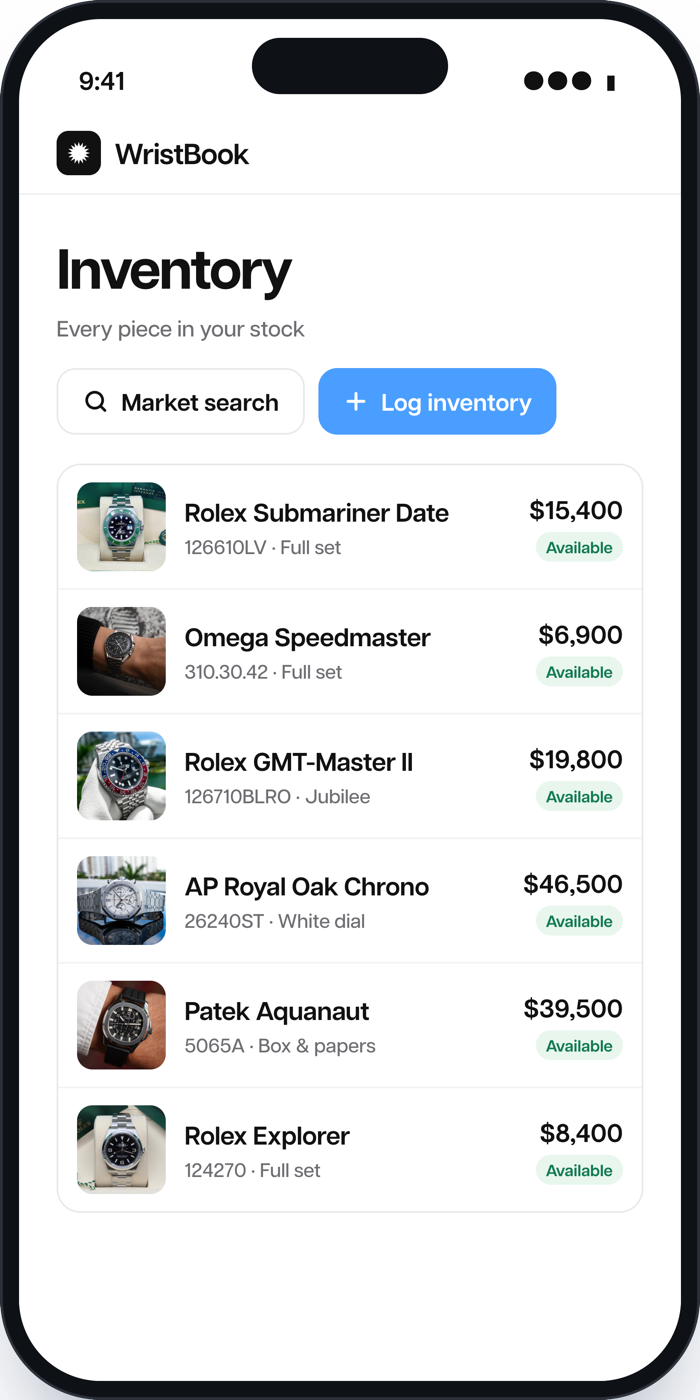
The WristBook inventory list: every piece in stock with its price and status.
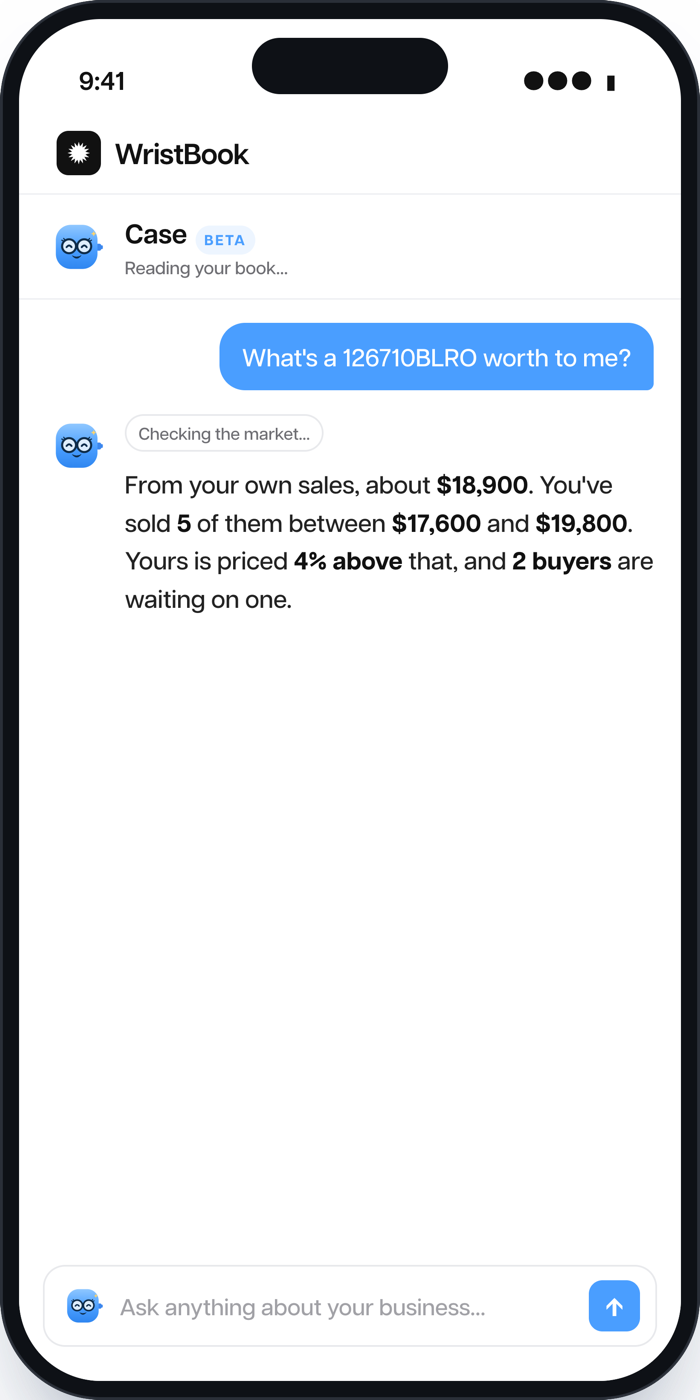
Asking Case what a watch is worth, answered from the dealer's own sales.
Everything you've been doing by hand

The Toolkit, running on your real deals.

You already know the questions. WristBook answers them on every piece, from your own numbers, without you starting from a blank calculator each time.

In the Toolkit

Max buy and pricing calculators

Type a sale price, get the most you should pay. Great for one deal, done fresh every time.

In WristBookChrono24 integration

A market check on every piece

What you've sold that reference for (median, range, last sale) next to your asking price, with one tap to live Chrono24 listings.

Market check126610LV
Your median$15,100
Your asking$15,400
You've sold4
See live listings on Chrono24↗
Sample data
In the Toolkit

"What records do I have to keep?"

The guides tell you: what you paid, the serial, when it came in. Then it's on you to keep them somewhere.

In WristBook

Kept as you go

Snap the watch and WristBook fills in the details. Add the serial and what you paid, and every piece carries its own record from the day it comes in.

Rolex GMT-Master IILogged
Reference126710BLRO
SerialOn file
You paid$16,800
In stock sinceSep 2
Sample data
In the Toolkit

The dealer paperwork kit

Fill in a form, download a bill of sale or an invoice. One document, one deal, typed in by hand.

In WristBook

The invoice comes from the deal

Record the sale once. The invoice is already filled in with the watch, the buyer and the price, with your shop's name on it. And the deal shows what you made.

Deal · Omega SpeedmasterPaid
Sold for$6,900
Your cost$5,650
Profit+$1,250
Sample data
In the Toolkit

The inventory aging calculator

Work out what a watch costs you every week it sits. Useful, if you remember to check.

In WristBook

It knows how long every piece has sat

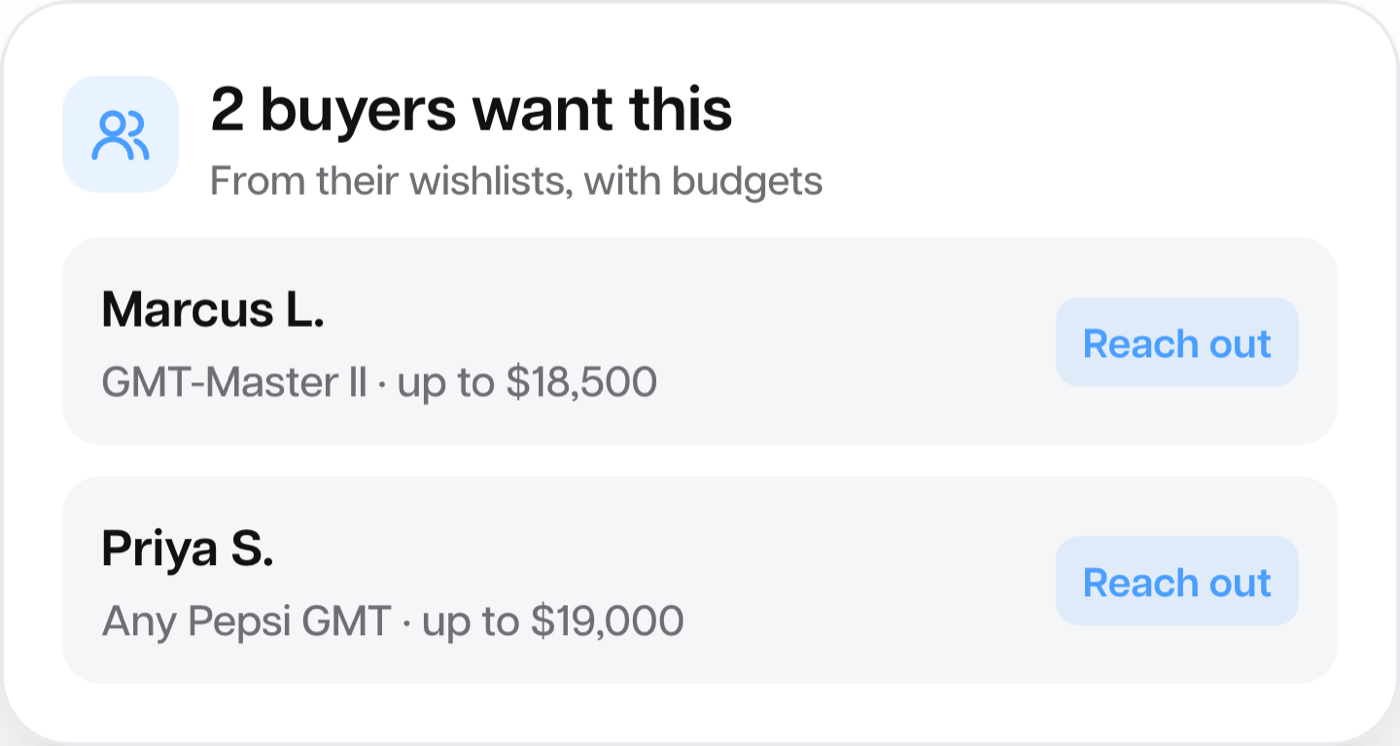
Every piece carries the day it came in, so you see what's aging at a glance, or just ask Case what's been sitting over 60 days. And it shows who's already asked for that watch, with their budget, so you can move it before it costs you more.

In stockDays on the shelf
Rolex Explorer · 12427074 days
Omega Speedmaster · 310.30.4231 days
Rolex GMT-Master II · 126710BLRO12 days
WristBook showing 2 buyers who want the watch, from their wishlists, with their budgets. Sample data
Your first 14 days

Start with the next watch you buy.

You don't need a big inventory or a spreadsheet to move over. Two weeks is enough to buy, log and sell a piece, and see your whole business in one place. Got a spreadsheet anyway? Import it on day one.

Day 1

Log your first watch

Take a photo. Brand, model and reference fill in themselves. Add what you paid.

Day 2

Add your buyers

Everyone who's asked you for something, and what they want. Matches start showing up.

Week 1

Put it in front of people

Your own storefront link, a shipping label from the deal, eBay if you sell there.

Day 14

See what you made

Every sale with its profit. Ask Case what's selling and what's sitting.

Meet Case

The Toolkit answers the trade's questions. Case answers yours.

Case is the assistant built into WristBook. Ask about your own stock, your own sales and your own buyers, in plain English.

What's a 126710BLRO worth to me?
From your own sales, about $18,900. You've sold 5 between $17,600 and $19,800. Yours is priced 4% above that, and 2 buyers are waiting on one.

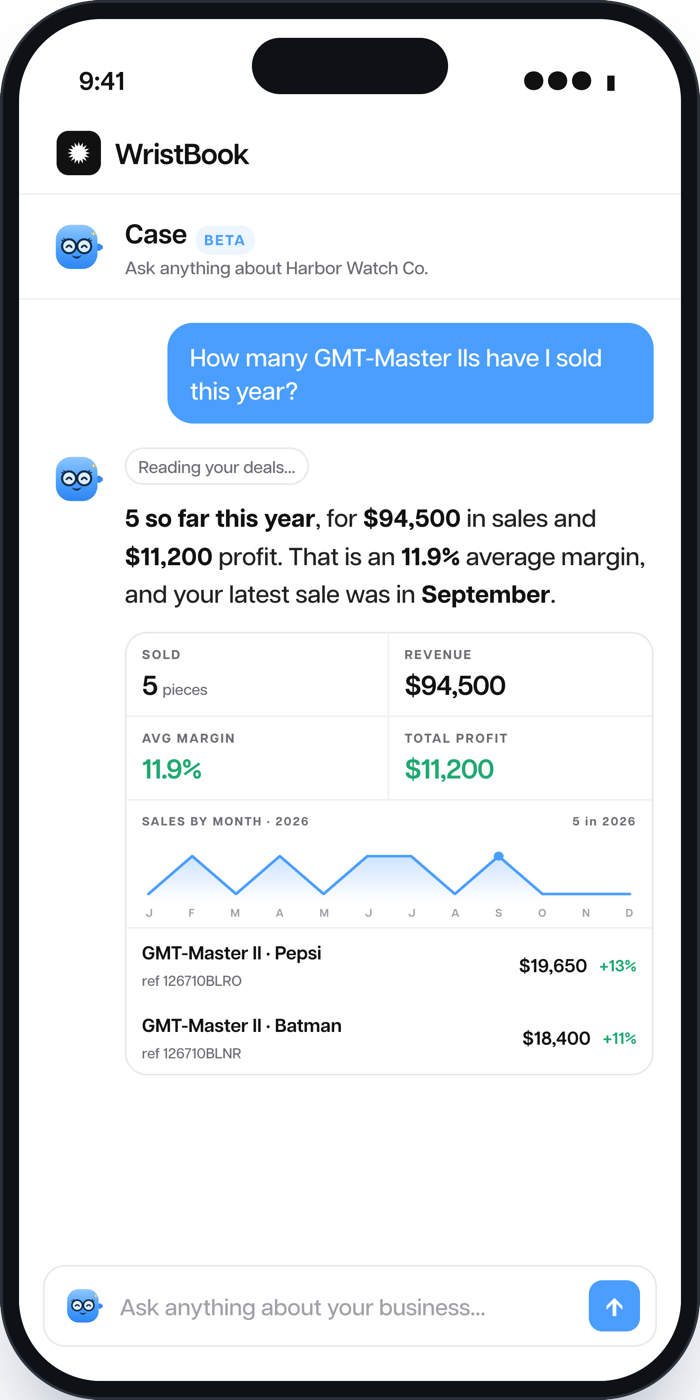
Sample data Case reads your data only, and never quotes prices it can't see. For the wider market, one tap opens live Chrono24 listings. Essentials includes Case with a monthly allowance.

Case in the WristBook app answering how many GMT-Master IIs were sold this year, with a card showing sold, revenue, average margin, total profit and a sales-by-month chart.
A dealer who started where you are

Vincent built his book on the side.

Vincent Mercandetti runs Moment for Time around a full-time job and two young kids, with no storefront and no big capital behind him. Here's what WristBook changed, in his own words.

I work full-time, I have two little kids. I don't have extra seconds, let alone hours, to work on this. So give me something I can work with and use on the run.

VM
Vincent MercandettiMoment for Time
$450KRevenue, year one
$1–8KEvery piece
Full-time + 2 kidsHow he built it

"I can do it on my phone, which is also something I'm not doing with Excel."

"I can go drop those pictures off on WristBook and it's gonna post it onto my website."

Where you start, where you grow

Start on Essentials. Move up when the business does.

Essentials is built for dealers getting going: the selling core, one seat, no limits on buyers or inventory.

14 days free

Essentials

Where you start
$29per month after the trial
  • Inventory with photo scan, serials and what you paid
  • Buyers, wishlists and automatic matches
  • Deals with profit and a ready invoice
  • Market check with Chrono24 search on every piece
  • Your own storefront link
  • Shipping labels and eBay
  • Case, with a monthly allowance
  • Unlimited buyers and inventory, 1 user
Start my 14 days free

Everything you log comes with you when you move up.

Questions

Before you start

Is it worth it if I only have a few watches?

That's the best time to start. It takes minutes to log a handful of pieces, and every one after that lands in the same place with its record, its buyers and its profit. Starting clean beats untangling a spreadsheet later.

What happens after the 14 days?

Your trial rolls into WristBook Essentials at $29 a month. Cancel anytime from Settings before it ends and you won't be charged.

Does the Toolkit stay free?

Yes. Watch Trading Toolkit stays free, with no account needed. WristBook is for when you want your own numbers kept for you, deal after deal.

Do I need a business license first?

It depends on where you buy and sell. The Toolkit's compliance checker builds your federal, state and city checklist. WristBook doesn't replace that advice, but it keeps the records the guides tell you to keep.

Can I bring my spreadsheet?

Yes. Import your inventory and buyers from a CSV on day one. On Dealer, we'll move your records in for you.

Who sees my data?

Only you. Your inventory, buyers and deals belong to your account, and Case only reads your own book.

Know your number. Keep your book.

Try WristBook free for 14 days, starting with the next watch you buy.

Start WristBook free
14 days freeThen Essentials, $29/moCancel anytime